• Beta-testing Internet Explorer 7

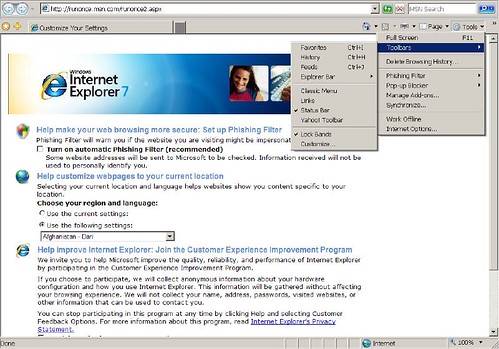
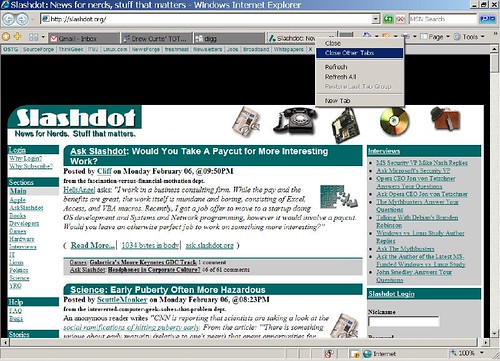
    Beta-testing Internet Explorer 7. Here are some screenshots and observations I’ve made so far.

    • Nice tabs. A lot like Firefox. Especially useful is the Quick Tabs feature (Ctrl+Q). Think of it as Expose for all your open tabs (see screenshots 2 and 4). This may be the primary feature as far as I’m concerned.
    • The layout is a lot more rounded – likely to make it look more seamless with Web 2.0/Ajax page designs.
    • Built-in RSS reader but in my build this feature is still very buggy.
    • Pages seem to load faster than in Firefox but this may be anecdotal.
  • Some of the problems with using Gmail

    Blogger Justin Blanton looks at some of the problems with using Gmail. Among his findings:

    • Doesn’t take you back to the Inbox after replying to an e-mail. As soon as I send an e-mail off I want to move on to something else. Instead, I have to wait for the send to complete and then click (or use a keyboard shortcut) to get back to the Inbox.
    • After selecting emails and applying some action to them, they are not unchecked after the action has been applied. This, perhaps, is the most annoying thing about Gmail. I can’t for the life of me figure out the logic behind this (or the technical reason why it hasn’t been fixed). What the hell!?!
    • No ability to specify the width of the application within the browser window — it always expands to the size of the window.

    Justin is also a pretty impressive photographer.

  • ‘Idol contestant (gently) fires back

    A few weeks ago music critic and betapundit reader jdmatthews of MusicalRamblings wrote a pretty raw critique of American Idol contestant (or rather, auditioner) Katrina Yauky. While ego-surfing one night, Katrina came across jd’s entry and wrote him a rather detailed and classy rhetort. She also sheds some light on the contractual process contestants undergo before auditioning. I found it to be revealing, but not hardly surprising:

    I will come to my defense only in that what you saw was an edited version of my actual audition. I actually sang three songs in an initial audition and was asked to come back an hour later and sing another! So, indeed, with how they edited the clip, I looked like a “half-cracked” airhead. Infact I got almost halfway into the ‘humpty dance’, sang ‘what’s up’ by 4 Non Blondes, and then sang part of an original song. When they asked me to come back in an hour…Simon actually asked me to lose the boots that you loved so much. I did, indeed, go back without the boots for the second audition and in a totally different outfit. My song and outfit in the second audition are what got me booted. So their reaction takes are actually from the second audition after I had sung four songs for them. Ahhh…the powers of editing. Honestly, would reality television be any fun if there weren’t any editing? I’m sure many of the other performers had similiar experiences of surprise while watching their performances that were likewise edited.

    Read Katrina’s email to jd its entirety.

  • What moondust smells like

    The Scent of Moondust. Pretty interesting read:

    When the Apollo astronauts returned to their lunar landers, they all noticed that the moondust – which had clung to their boots and suits – had some interesting properties. For starters, it smelled like spent gunpowder; as if someone had just fired a gun in the lander. Apollo 17’s Jack Schmitt came down with a brief case of extraterrestrial hay fever. (more)


  • The 100 best first lines from novels

    American Book Review has listed the 100 best first lines from novels:

    1. Call me Ishmael. —Herman Melville, Moby-Dick (1851)

    2. It is a truth universally acknowledged, that a single man in possession of a good fortune, must be in want of a wife. —Jane Austen, Pride and Prejudice (1813)

    3. A screaming comes across the sky. —Thomas Pynchon, Gravity’s Rainbow (1973)

    4. Many years later, as he faced the firing squad, Colonel Aureliano Buendía was to remember that distant afternoon when his father took him to discover ice. —Gabriel García Márquez, One Hundred Years of Solitude (1967; trans. Gregory Rabassa)

    5. Lolita, light of my life, fire of my loins. —Vladimir Nabokov, Lolita (1955)

    But I call Shennanigans. The ABR doesn’t include anywhere in their list Capote’s opener from Breakfast at Tiffany’s:


    I am always drawn back to places where I have lived, the houses and their neighborhoods.

    See the full list.

  • Vintage Aviation Hoax Photos

    Found this today. Great examples of vintage hoax photos.


  • The complete n00b’s guide to free and reliable Windows software

    How to keep a system clean, stable and inexpensive

    I’ve wanted for some time to make a streamlined list of really effective Windows-based freeware that I think a lot of people will find useful in maximizing not only their computer’s performance and security but also their personal budget. I plan on updating this list as I find and test more freeware and open source software, so bookmark this page and consultant it regularly. You may also wish to send it to friends or family who recently purchased a new system and don’t want to spend hundreds of dollars on new software for common tasks.

    Keep in mind this is a non-Geek’s guide to Windows-based freeware. You will find that these programs are easy to install and use. The super tech-savvy will engage in endless debates on what freeware is best for a particular task, but I’m confident these programs offer bar none the most usability, stability, and value than anything else a “common user” or tech novice would need for everyday or semi-advanced purposes.

    Few things are more frustrating than buying expensive software then having to spend a lot of time learning it only to find out it was over packed with features that will remain largely unused. Spending hundreds of dollars on Photoshop to merely remove redeye from your holiday pictures might be a good example of this. Many lay users will purchase Photoshop simply because that brand has mindshare. The purpose of this list is to remind you that just because some developers don’t spend millions of dollars advertising their software doesn’t mean their products aren’t effective. In fact, because many of these programs are open-source, you’ll find that they are far superior to the big boys.

    This is a list of software I currently use or have at least tested for a considerable amount of time and have found to be safe alternatives to their commercial counterparts.

    This is the software I usually insist friends and family install on their new computer the moment it comes out of the box. This stuff is safe and oftentimes more stable than their commercial counterparts. Best of all, it’s all free.

    AVG Antivirus. A must have to protect your system from malicious viruses. It’s crucial that you keep your virus definitions up-to-date. I update mine at least once every two days.

    ZoneAlarm. Despite recent privacy concerns, I’m a pretty big proponent of ZA, especially for broadband connections. ZA will block third-party attempts to enter your system through your network. If you’re not running a firewall you are seriously at risk and have likely already been compromised.

    OpenOffice Some people choose to run a Microsoft-free environment on their computers. I’m not necessarily one of them and it’s difficult for me to find a better alternative to Microsoft Word. Despite all of Microsoft’s evils, Word is a superior piece of software. If, however, you cannot or will not buy Word, OpenOffice is a good word processing alternative. Keep in mind you may need to learn a few workarounds in order to maintain compatibility if you share documents, say, with your Word-utilizing workplace or consultants. OpenOffice comes bundled with alternatives to most of the programs that come bundled in Microsoft Office, including a spreadsheet utility.

    Mozilla FireFox This is a gimme. Internet Explorer’s security issues and vulnerabilities make it a significant risk to both your machine and your sanity. Firefox circumvents these issues, and I find the browser to be more usable and customizable than any other browser on the market.

    Mozilla Thunderbird Also from the Mozilla Foundation, this is a very solid and reliable email utility that serves as a replacement for Outlook. I use web-based Gmail, but if you have to use an email client this is your best choice.

    Paint.net A superb alternative to Photoshop. I’ve done several Photoshop tutorials this past week and I tested Paint.net on them. It’s virtually seamless and has most of the same features you will use to make funny pictures of your friends or of politicians. You can do comprehensive photo illustrations or just standard photo enhancement tasks. Here’s a great list of Photoshop tutorials that will teach you many wonderful things.

    Adaware A great way to clean your machine of the nastylittle bugs that accumulate while web browsing. Don’t rely solely on your browser’s cookie settings. Use Adaware to protect your privacy and keep malicious bugs out of your system. I recommend running a scan at least once a week.

    Audacity An excellent audio editor and recorder. Especially useful for editing your MP3s and recording podcasts.

    iTunes This is what I use to play, burn and buy my digital music, mainly because I own an iPod. Some critics are skeptical of Apple’s Digital Rights Management, but I haven’t had any major problems with Apple’s restrictions on the music and audiobooks I’ve purchased.

    Winamp If the above issues with iTunes concerns you, Winamp will be the best alternative for you. Winamp features lots of customizable skins and offers a little more freedom than iTunes, but at the cost of a slightly sloppier interface. Keep in mind Winamp does not include a music store.

    Skype Voice Over Internet Provider, or VoIP, is a true competitor for old-school telecommunications. Skype will let you voice-chat and IM with other users over your broadband connection. Just think of the money you’ll save on long-distance. Use your own mic and speakers or buy a USB telephone. You probably won’t hear the difference in quality.

  • Wireless TiVo

    We found out tonight how much TiVo comes to life once you connect it to your wireless broadband. No more plugging it into the phone line once every 2 weeks or running out of programming information if you forget to do so.

    Even more impressive is the ability to browse movie times and buy tickets, stream audio content and listen to podcasts. Yahoo! has an impressive built in feature that provids weather and traffic data.

    TiVo content can be wirelessly transferred to our laptops and burned to DVD, albeit at horribly slow speeds.

    This is an interesting way to sneak towards the living room based multimedia center.

    The downside of course is the cost. I originally purchased a Linksys wireless adapter from Best Buy the was totally incompatible with our Series 2 unit. Lauren, always the wiser, purchased an adapter directly from TiVo in an effort to offset my inability to measure compatibility.

    Note that the special content must be request from TiVo by filling in your service # on this form.