• 2011 MacBook Pro upgrade

    I’ve written before about customer service at the Apple Store here in Austin. Here’s another experience worth sharing.

    On Jan. 22 I bought a 13″ 2010 MacBook Pro at The Domain. Earlier this week, the new MacBook Pro models were announced. I was impressed enought with the new models — especially the Thunderbolt i/o and i5 processor contained in the 13″ model — to take a chance and call the Apple Store about an exchange.

    Without any hesitation, they agreed to exchange my 2010 Pro for the newer 2011 model. No questions, no fees, just an even swap. I was out of the store in 10 minutes, which was an added bonus as I’m currently fighting a virus.

    The new machine is a nice step up for the MacBook Pro line. Big thanks to the managers and staff at The Domain’s Apple Store for always being of assistance.
     

  • 2011 MacBook Pro details leaked?

    These images are convincing, and the specs sound about right.

  • Ferris Bueller’s Wrigley Field scene explored

    In Cubs Nation there’s been some confusion and bickering regarding exactly when in 1985 the cast and crew of Ferris Bueller’s Day Off shot the scene at Wrigley Field.

    Fortunately, Ken Collins, who served as second assistant director for the shooting, responded to a request from Al Yellon to clarify the situation:

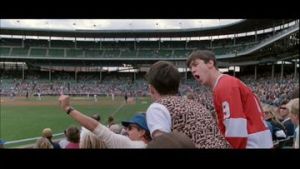
    I was the second assistant director on the movie. That’s me sitting in front of Ferris and Cameron wearing Raybans and a Cub cap. I put myself into the scene as an extra. Being an L.A. guy, I had wanted to wear a Dodger cap but John Hughes said no way! We started our shooting in Chicago on September 9, 1985.

    We definitely were at Wrigley on a game day. We started around 10am filming actor closeups and dialogue with a bunch of our extras in a specially designated part of the bleachers. When the game started, we grabbed some shots over the actors connecting them to the game and then we pulled out and moved up the street a couple of blocks to continue filming another scene. We left a camera behind to pick up some miscellaneous shots. We were close enough to the stadium to hear the crowd roaring and a lot of us continued to listen to Harry call the game. It got colder and windier and the game turned into a typical Wrigley slugfest where over 30 runs were scored. I’m pretty sure that the game was played on Sept. 24, 1985 and the Cubs lost to the Expos 17-15.

    We filmed the famous Danke Shoen-Twist and Shout sequence at the Von Steuben’s Day parade on the following Saturday.

    So that settles it.

  • Flipboard’s Mike McCue on how chasing Web traffic is hurting journalism

    Chasing pageviews is drastically affecting the quality of information, and journalism in particular:

    The problem with journalism on the Web today is that it’s being contaminated by the Web form factor. What I mean is, journalists are being pushed to do things like slide shows — stuff meant to attract page views. Articles themselves are condensed to narrow columns of text across 5, 6, 7 pages, and ads that are really distracting for the reader, so it’s not a pleasant experience to ‘curl up’ with a good website.

    Journalism is being pushed into a space where I don’t think it should ever go, where it’s trying to support the monetization model of the Web by driving page views. So what you have is a drop-off of long-form journalism, because long-form pieces are harder to monetize. And it’s also hard to present that longer stuff to the reader because no one wants to wait four seconds for every page to load.

  • Boot Camp partitioning errors: Quick fix

    Apple’s Boot Camp doesn’t play well with OSX Snow Leopard. One of the most common errors that users attempting to create a dual boot partition in Boot Camp is:
    Your Disk Cannot Be Partitioned Because Some Files Cannot Be Moved. 
Back up the disk and use Disk Utility to format the disk as a single Mac OS Extended (Journaled) volume. Restore your information to the disk and try using Boot Camp Assistant again.

    There are a lot of reported fixes for this, including backing up your entire hard drive to Time Machine, reformatting the drive, and restoring from backup.

    However, there’s a much simpler solution that worked for me that only takes a couple of minutes. I wrestled with this problem for hours. After discovering a simple solution, I figured I met as well post it here to help anyone else experiencing the same problem.

    If you’re experiencing the above error message in Boot Camp, here’s what to do:

    1. Shut down your Mac
    2. Restart while holding Command+S
    3. At the prompt, type:

    /sbin/fsck -fy

    Shut down. Restart. Open Boot Camp Assistant and partition the drive.

    For almost all users, this simple procedure alleviates the problem.

    This will start a disk check utility that will automatically fix the error that prevents a drive from partitioning within Boot Camp.

  • Yeah. So about those 2011 MacBook Pros.

    News that Intel’s Sandy Bridge processor has been delayed due to a design flaw is breaking hearts –– perhaps none more than those waiting for the much anticipated update to Apple’s MacBook Pro line.

    The MacBook Pro, already almost three months “late” for a revision, is widely expected to have Sandy Bridge.

    My guess is we won’t see MacBook Pro updates for quite awhile. At least not until summer.

    Good news, though. Apple has great deals on Intel Core 2 Duo MacBook Pro in its refurbished store.

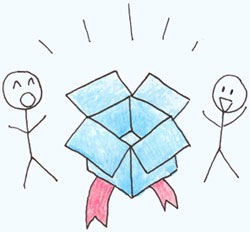
  • Why Dropbox is better than everything else

    dropbox.jpg

    Via Quora:

    Well, let’s take a step back and think about the sync problem and what the ideal solution for it would do:

    • There would be a folder.
    • You’d put your stuff in it.
    • It would sync.

    They built that.

    Why didn’t anyone else build that? I have no idea.

    “But,” you may ask, “so much more you could do! What about task management, calendaring, customized dashboards, virtual white boarding. More than just folders and files!”

    No, shut up. People don’t use that crap. They just want a folder. A folder that syncs.

    “But,” you may say, “this is valuable data…certainly users will feel more comfortable tying their data to Windows Live, Apple Mobile Me, or a name they already know.”

    No, shut up. Not a single person on Earth wakes up in the morning worried about deriving more value from their Windows Live login. People already trust folders. And Dropbox looks just like a folder. One that syncs.

    “But,” you may say, “folders are so 1995. why not leverage the full power of the web? With HTML 5 you can drag and drop files, you can build intergalactic dashboards of stats showing how much storage you are using, you can publish your files as RSS feeds and tweets, and you can add your company logo!”

    No, shut up. Most of the world doesn’t sit in front of their browser all day. If they do, it is IE 6 at work that they are not allowed to upgrade. Browsers suck for these kinds of things. Their stuff is already in folders. They just want a folder. That syncs.

    That is what it does.

  • Timbuk2

    These bags really are that good.