


A few weeks ago I decided to install the newest version of AOL Instant Messenger on my laptop at the request of Kevin Rose who wanted to chat about the discovery of a technical glitch on Digg.
Although I configured the setup utility to install only AIM and none of the other malware AOL tries to install by default, it still installed their miserable browser, which automatically set itself as the default browser for several apps including the Flickr image upload utility.
The browser would start itself at random times – especially when I was doing anything involving AIM or Flickr.
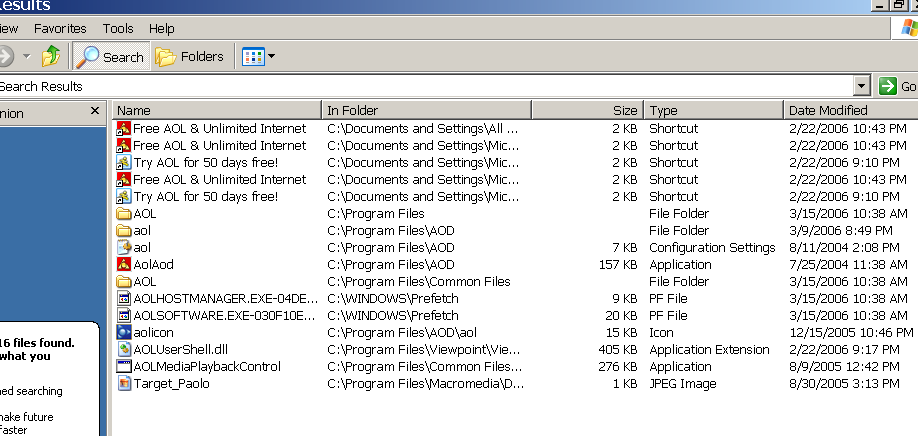
Naturally, the AOL browser doesn’t show up in the Windows Add/Remove Programs utility. Instead, only the AIM program itself does. After finally getting angry enough to uninstall AIM in the hope of getting rid of AOL’s trash browser, I decided to search my hard drive for AOL programs, and saw that all these files were still embedded in my computer. I stress the fact that files were found on my computer after I uninstalled every AOL program using it’s uninstaller.
(click to enlarge)
Before anything else, I visited AOL Tech Support’s Website for assistance. Naturally, this is the page that comes up when you click on a button that offers help on uninstalling AOL:

If you want to do yourself and your computer a favor, stay far away from anything with the AOL brand.

 Here’s a handy guide to tweaking some Windows XP setting that should help you get the most out of your broadband connection:
 That MC Hammer has
  There are a lot of reasons to want to move your Outlook email archives into a Gmail account. I find that many companies grant their employeees very little email space on the servers, creating a need to always have to backup and archive your email locally on your work computer.
 Michael Castellon